Android Canvas 绘图艺术(一):常用图形绘制与色彩填充指南
在 Android 自定义 View 中,onDraw(Canvas canvas) 是我们施展才华的画布。而 Canvas(画布)类提供了一系列丰富的绘制 API,允许我们绘制出任何我们能想象到的平面视觉效果。
要想成为自定义 View 高手,第一步就是熟练使用 Canvas 绘制基础图形。本文将为你梳理 Canvas 中最常用的色彩填充与几何图形绘制方法。
准备工作:关于 Paint 画笔
Canvas 的绘制方法大都离不开 Paint(画笔)参数。关于 Paint 的各种样式和属性配置(如抗锯齿、描边粗细、线条端点等),可以参考本系列的另一篇文章:神笔 Paint 的属性与高级配置。
一、 颜色填充(设置画布底色)
在开始绘制复杂的图形前,我们通常需要填充整张画布。这常用于设置自定义 View 的背景底色,或者在绘制完主体内容后再加一层半透明蒙版。
Canvas 提供了三种快捷的颜色填充方法:
drawColor(int color):填充指定颜色。drawRGB(int r, int g, int b):利用红、绿、蓝三原色分量填充。drawARGB(int a, int r, int g, int b):填充带透明度(Alpha)通道的颜色。
// 绘制一个带半透明红色的蒙版
canvas.drawARGB(100, 255, 0, 0);
二、 绘制基础几何图形
1. 画圆:drawCircle
画圆是自定义 View 中最常用的操作之一,例如绘制圆形头像、圆点指示器等。
-
方法签名:
public void drawCircle(float centerX, float centerY, float radius, Paint paint)centerX,centerY:圆心的 X、Y 坐标(单位:像素)。radius:圆的半径。paint:绘制所用的画笔。
-
示例代码:
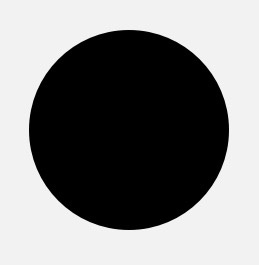
// 在 (300, 300) 处绘制一个半径为 200 的圆
canvas.drawCircle(300, 300, 200, paint);
2. 画矩形:drawRect
用于绘制普通矩形或正方形。
-
方法签名:
Canvas 提供了三种重载来指定矩形边界:public void drawRect(float left, float top, float right, float bottom, Paint paint)或者传入
Rect/RectF对象:public void drawRect(RectF rect, Paint paint) public void drawRect(Rect rect, Paint paint)注:
RectF的参数是 float 类型,Rect的参数是 int 类型。 -
示例代码:
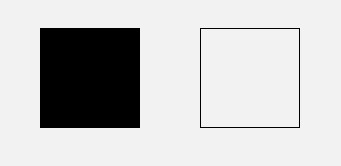
// 填充模式绘制左边矩形
paint.setStyle(Paint.Style.FILL);
canvas.drawRect(100, 100, 500, 500, paint);

// 描边模式绘制右边矩形
paint.setStyle(Paint.Style.STROKE);
canvas.drawRect(700, 100, 1100, 500, paint);
3. 画点与批量点:drawPoint & drawPoints
绘制屏幕上的像素点。
单个点:drawPoint
-
方法签名:
public void drawPoint(float x, float y, Paint paint) -
配置属性:
点的大小和形状完全取决于画笔Paint的配置:- 点的大小:通过
paint.setStrokeWidth(width)设置。 - 点的形状:通过
paint.setStrokeCap(cap)设置。Paint.Cap.ROUND:圆形端点(画出来是圆点)。Paint.Cap.SQUARE或Paint.Cap.BUTT:方形端点(画出来是方点)。
- 点的大小:通过
-
示例代码:
// 绘制圆点
paint.setStrokeWidth(20);
paint.setStrokeCap(Paint.Cap.ROUND);
canvas.drawPoint(50, 50, paint);
// 绘制方点
paint.setStrokeWidth(20);
paint.setStrokeCap(Paint.Cap.SQUARE);
canvas.drawPoint(50, 50, paint);
批量点:drawPoints
当需要批量绘制很多点时,使用 drawPoints 效率更高。
-
方法签名:
public void drawPoints(float[] pts, int offset, int count, Paint paint) public void drawPoints(float[] pts, Paint paint)pts:点的坐标数组,每两个元素代表一个点的 (x, y) 坐标。offset:跳过数组的前几个数再开始读取坐标。count:一共要读取绘制多少个数值(注意:不是点的个数,而是坐标数值的个数,点数 = count / 2)。
-
示例代码:
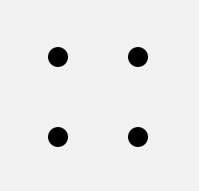
float[] points = {0, 0, 50, 50, 50, 100, 100, 50, 100, 100, 150, 50, 150, 100};
// 跳过前 2 个元素 (0, 0),绘制接下来的 8 个数值(代表 4 个点)
// 绘制的点为 (50, 50), (50, 100), (100, 50), (100, 100)
canvas.drawPoints(points, 2, 8, paint);
4. 画椭圆:drawOval
绘制横向或纵向的椭圆。
-
方法签名:
public void drawOval(float left, float top, float right, float bottom, Paint paint) public void drawOval(RectF rect, Paint paint)left,top,right,bottom是这个椭圆外接矩形的左、上、右、下四个边界坐标。- ⚠
drawOval只能直接绘制横平竖直的椭圆。如果需要绘制倾斜的椭圆,需要配合几何变换(如canvas.rotate()旋转画布)。
-
示例代码:
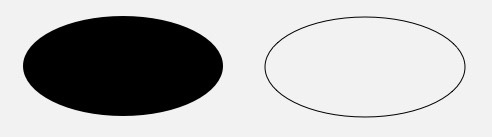
// 绘制填充椭圆
paint.setStyle(Paint.Style.FILL);
canvas.drawOval(50, 50, 350, 200, paint);

// 绘制描边椭圆
paint.setStyle(Paint.Style.STROKE);
canvas.drawOval(400, 50, 700, 200, paint);
三、 总结与延伸
掌握了上述基础图形的绘制,你已经具备了构建简易自定义控件的能力。然而,Canvas 的强大不仅于此。在面对更为复杂的曲线或几何组合图形时,我们需要请出两个重量级角色:
- 使用 Path 路径 实现任意复杂的自定义轮廓与高阶贝塞尔曲线。
- 使用 Paint 的高级样式设置 让线条更加多姿多彩。