使用 layout() 方法实现滑动
View进行绘制的时候会调用onLayout()方法来设置显示的位置,因此我们同样也可以通过修改View的left、top、right、bottom这四种属性来控制View的坐标。 首先我们要自定义一个View,在onTouchEvent()方法中获取触摸点的坐标:
class CustomView @JvmOverloads constructor(
    context: Context, attrs: AttributeSet? = null, defStyleAttr: Int = 0
) : View(context, attrs, defStyleAttr) {

    private var lastX: Int = 0
    private var lastY: Int = 0

    override fun onTouchEvent(event: MotionEvent): Boolean {
        val x = event.x.toInt()
        val y = event.y.toInt()
        when (event.action) {
            MotionEvent.ACTION_DOWN -> {
                lastX = x
                lastY = y
            }

            MotionEvent.ACTION_MOVE -> {
                val offsetX = x - lastX
                val offsetY = y - lastY
                //在这里使用layout()方法实现滑动
                layout(
                    left + offsetX,
                    top + offsetY,
                    right + offsetX,
                    bottom + offsetY
                )
            }

            else -> {}
        }
        return true
    }
}
使用 offsetLeftAndRight() 与 offsetTopAndBottom()方法实现滑动
class CustomView @JvmOverloads constructor(
    context: Context, attrs: AttributeSet? = null, defStyleAttr: Int = 0
) : View(context, attrs, defStyleAttr) {

    private var lastX: Int = 0
    private var lastY: Int = 0

    override fun onTouchEvent(event: MotionEvent): Boolean {
        val x = event.x.toInt()
        val y = event.y.toInt()
        when (event.action) {
            MotionEvent.ACTION_DOWN -> {
                lastX = x
                lastY = y
            }

            MotionEvent.ACTION_MOVE -> {
                val offsetX = x - lastX
                val offsetY = y - lastY
                //在这里使用offsetXXXAndXXX()方法实现滑动
                offsetLeftAndRight(offsetX)
                offsetTopAndBottom(offsetY)
            }

            else -> {}
        }
        return true
    }
}
使用 scrollTo/scrollBy
View类提供了scrollTo和scrollBy的方法来实现View的移动。其中
scrollTo是滑向指定的参数坐标,属于绝对滑动;scrollBy是基于当前位置滑动指定参数,属于相对滑动。scrollTo、scrollBy滑动的是View中的内容(而且还是整体滑动),而不是View本身。
/**
 * Set the scrolled position of your view. This will cause a call to * {@link #onScrollChanged(int, int, int, int)} and the view will be
 * invalidated. * @param x the x position to scroll to
 * @param y the y position to scroll to
 */
public void scrollTo(int x, int y) {
    if (mScrollX != x || mScrollY != y) {
        int oldX = mScrollX;
        int oldY = mScrollY;
        mScrollX = x;
        mScrollY = y;
        invalidateParentCaches();
        onScrollChanged(mScrollX, mScrollY, oldX, oldY);
        if (!awakenScrollBars()) {
            postInvalidateOnAnimation();
        }
    }
}

/**
 * Move the scrolled position of your view. This will cause a call to
 * {@link #onScrollChanged(int, int, int, int)} and the view will be
 * invalidated.
 * @param x the amount of pixels to scroll by horizontally
 * @param y the amount of pixels to scroll by vertically
 */
public void scrollBy(int x, int y) {
    scrollTo(mScrollX + x, mScrollY + y);
}
📐滑动原理
- 通过不断改变View内部的
mScrollX和mScrollY两个属性的值,并重绘View实现。 - 滑动过程中,mScrollX = View的左边缘和View内容左边缘在水平方向的距离;mScrollY = View的上边缘和View内容上边缘在竖直方向的距离。
- View的边缘指的是View的位置。View的内容边缘指的是View的内容的边缘。
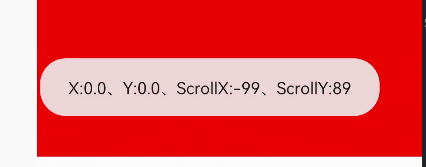 (xy为0即View本身没有发生移动,变化的是scrollX和scrollY)
- 如果从左往右移动,mScrollX为负值,反之为正值。
- 如果从上往下移动,mScrollY为负值,反之为正值。
📚 跟着手势滑动window.decorView
override fun onTouchEvent(event: MotionEvent): Boolean {
    val x = event.x.roundToInt()
    val y = event.y.roundToInt()
    val action = event.action
    val decorView = window.decorView
    when (action) {
        MotionEvent.ACTION_DOWN -> {
            mLastX = x
            mLastY = y
        }
        MotionEvent.ACTION_MOVE -> {
            val dx = mLastX - x
            val dy = mLastY - y
            val oldScrollX = decorView.scrollX
            val oldScrollY = decorView.scrollY
            val newScrollX = oldScrollX + dx
            val newScrollY = oldScrollY + dy
            decorView.scrollTo(newScrollX, newScrollY)
            mLastX = x
            mLastY = y
        }
    }
    return true
}
改变布局参数
通过改变布局参数,即LayoutParams实现View的滑动。
📚如想把一个View向右平移100px,只需将View的 marginLeft 参数增加100px即可
binding.button1.setOnClickListener {
    binding.view1.updateLayoutParams<MarginLayoutParams> {
        leftMargin += 100
    }
}
总结
scrollTo/scrollBy操作简单,适合对View内容的滑动- 动画 操作简单,主要适合用于没有交互的View和实现复杂的动画效果
- 改变参数布局 操作稍微复杂,适用于有交互的View
📚实现一个全屏跟手移动的自定义View
class CustomMoveView @JvmOverloads constructor(
    context: Context,
    attrs: AttributeSet? = null,
    defStyleAttr: Int = 0,
) : View(context, attrs, defStyleAttr) {

    private var mLastX = 0
    private var mLastY = 0

    override fun onTouchEvent(event: MotionEvent): Boolean {
        val x = event.rawX.roundToInt()
        val y = event.rawY.roundToInt()
        val action = event.action
        when (action) {
            MotionEvent.ACTION_MOVE -> {
                val deltaX = x - mLastX
                val deltaY = y - mLastY
                translationX += deltaX
                translationY += deltaY
            }
        }
        mLastX = x
        mLastY = y
        return true
    }
}